
About Folder Structures In Archives
[C#, .NET, Compression]
Over the past series of posts, we have been looking at how to add files to various archive types - Zip, Gzip, and 7z.
One thing you must be cognisant of is how exactly you are adding the files to the archive.
Are you adding the directory containing the files, or the files themselves?
Take the following folder:

When you say you want to add these files to an archive, you can mean one of two things:
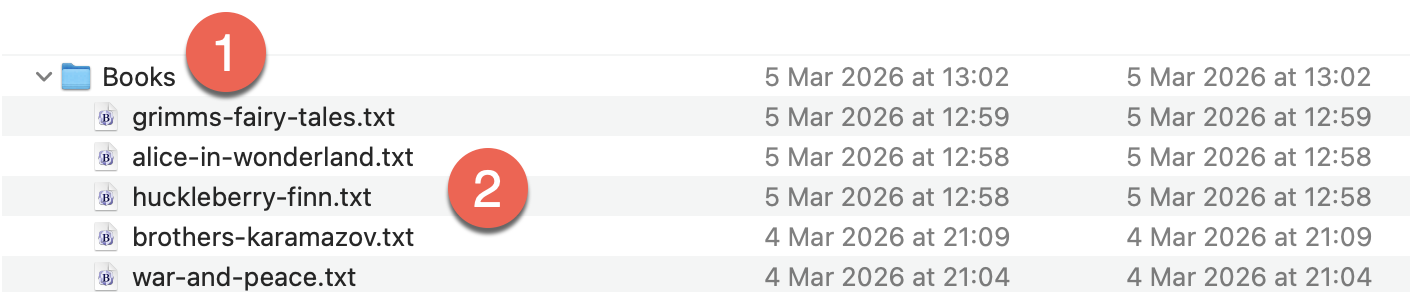
- Add the directory
Booksitself to the archive - Add the files directly to the archive
This can be illustrated by creating two archives and listing their contents to demonstrate the difference.
The folder structure is as follows:
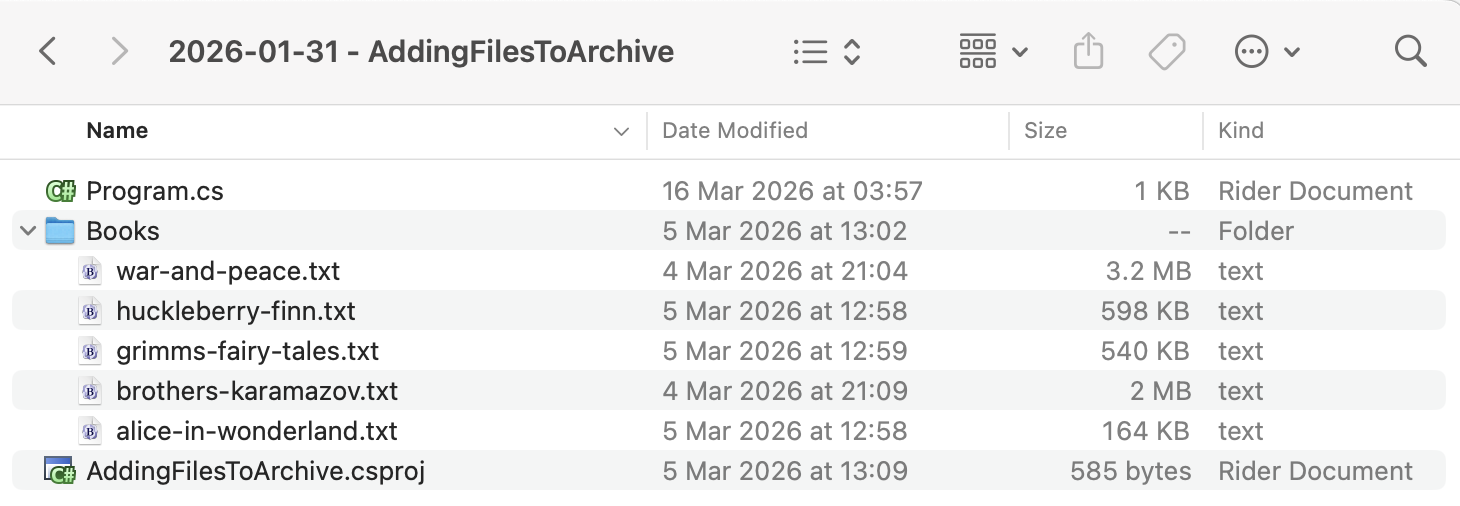
The files to add are in the Books folder.
To ensure the folder is always copied to the output, we add the following entry to our .csproj.
<ItemGroup>
  <None Include="Books\**\*">
  	<CopyToOutputDirectory>PreserveNewest</CopyToOutputDirectory>
  </None>
</ItemGroup>
The code is as follows:
using System.IO;
using System.Reflection;
using CliWrap;
using CliWrap.Buffered;
using Serilog;

Log.Logger = new LoggerConfiguration()
    .WriteTo.Console().CreateLogger();

// Extract the current folder where the executable is running
var currentFolder = Path.GetDirectoryName(Assembly.GetExecutingAssembly().Location)!;

// Construct folder to the input files
var folderWithBooks = Path.Combine(currentFolder, "Books");

// Construct the full path to the target archives
var targetArchiveWithFolder = Path.Combine(currentFolder, "BooksWithFolder.7z");
var targetArchiveWithFiles = Path.Combine(currentFolder, "BooksWithFiles.7z");

// Path to 7zip executable
const string executablePath = "/opt/homebrew/bin/7zz";

// Create the first archive, with the folder
var result = await Cli.Wrap(executablePath) // Set the path to the executable
    .WithArguments(args => args
            .Add("a") //Specify to create an archive
            .Add("-t7z") // Specify the target format - 7z
            .Add(targetArchiveWithFolder) // Target file name
            .Add($"{folderWithBooks}") // The files in the source folder
            .Add("-mhe=on") // encrypt file names
            .Add("-mx=9") // max compression
    )
    .ExecuteBufferedAsync();

// Check if the process succeeded
if (result.ExitCode != 0)
    Log.Error("7-Zip failed: {Message}", result.StandardError);
else
    Log.Information("Added folder to {File}", targetArchiveWithFolder);


// Create the second archive, with the files
result = await Cli.Wrap(executablePath) // Set the path to the executable
    .WithArguments(args => args
            .Add("a") //Specify to create an archive
            .Add("-t7z") // Specify the target format - 7z
            .Add(targetArchiveWithFiles) // Target file name
            .Add($"{folderWithBooks}//*") // The files in the source folder
            .Add("-mhe=on") // encrypt file names
            .Add("-mx=9") // max
    )
    .ExecuteBufferedAsync();

// Check if the process succeeded
if (result.ExitCode != 0)
    Log.Error("7-Zip failed: {Message}", result.StandardError);
else
    Log.Information("Added folder to {File}", targetArchiveWithFolder);

//
// Extract both archives
//

result = await Cli.Wrap(executablePath) // Set the path to the executable
    .WithArguments(args => args
            .Add("l") //Specify to list archive contents
            .Add(targetArchiveWithFolder) // Source zip file
    )
    .ExecuteBufferedAsync();

// Check if the process succeeded
if (result.ExitCode != 0)
    Log.Error("7-Zip failed: {Message}", result.StandardError);
else
    Log.Information("Files In {File} (Folder) - {Listing}", targetArchiveWithFolder, result.StandardOutput);

result = await Cli.Wrap(executablePath) // Set the path to the executable
    .WithArguments(args => args
            .Add("l") //Specify to list archive contents
            .Add(targetArchiveWithFiles) // Source zip file
    )
    .ExecuteBufferedAsync();

// Check if the process succeeded
if (result.ExitCode != 0)
    Log.Error("7-Zip failed: {Message}", result.StandardError);
else
    Log.Information("Files In {File} (Folder) - {Listing}", targetArchiveWithFolder, result.StandardOutput);
The difference is in how we add the files to the archive.
For the directory itself, we do it like this:
.Add(targetArchiveWithFolder) // Target file name
.Add($"{folderWithBooks}") // The files in the source folder
For the files in the directory, we do it like this:
.Add(targetArchiveWithFiles) // Target file name
.Add($"{folderWithBooks}//*") // The files in the source folder
If we run the code, it will print the two different listings.
The archive to which we added the directory will list as follows:
 Date      Time    Attr         Size   Compressed  Name
------------------- ----- ------------ ------------  ------------------------
2026-03-21 13:35:41 D....            0            0  Books
2026-03-05 12:58:56 ....A       163779      1824029  Books/alice-in-wonderland.txt
2026-03-04 21:09:18 ....A      1995783               Books/brothers-karamazov.txt
2026-03-05 12:59:03 ....A       540174               Books/grimms-fairy-tales.txt
2026-03-05 12:58:24 ....A       597794               Books/huckleberry-finn.txt
2026-03-04 21:04:59 ....A      3202320               Books/war-and-peace.txt
Note here the Books prefix.
The archive to which we added the files will list as follows:
   Date      Time    Attr         Size   Compressed  Name
------------------- ----- ------------ ------------  ------------------------
2026-03-05 12:58:56 ....A       163779      1824029  alice-in-wonderland.txt
2026-03-04 21:09:18 ....A      1995783               brothers-karamazov.txt
2026-03-05 12:59:03 ....A       540174               grimms-fairy-tales.txt
2026-03-05 12:58:24 ....A       597794               huckleberry-finn.txt
2026-03-04 21:04:59 ....A      3202320               war-and-peace.txt
------------------- ----- ------------ ------------  ------------------------
2026-03-05 12:59:03            6499850      1824029  5 files
TLDR
When adding files to an archive, it is important to be clear whether you are adding the directory or the files in the directory.
The code is in my GitHub.
Happy hacking!