
Accessing Zip File Metadata Using System.IO.Compression In C# & .NET
[C#, .NET, Compression]
Recently, we have been posting about how to create zip files and extract their contents.
In this post, we will address the case where you don’t actually want to extract the files (yet) but just want to view the contents of the Zip file.
There are several attributes we can access when using classes in the System.IO.Compression namespace.
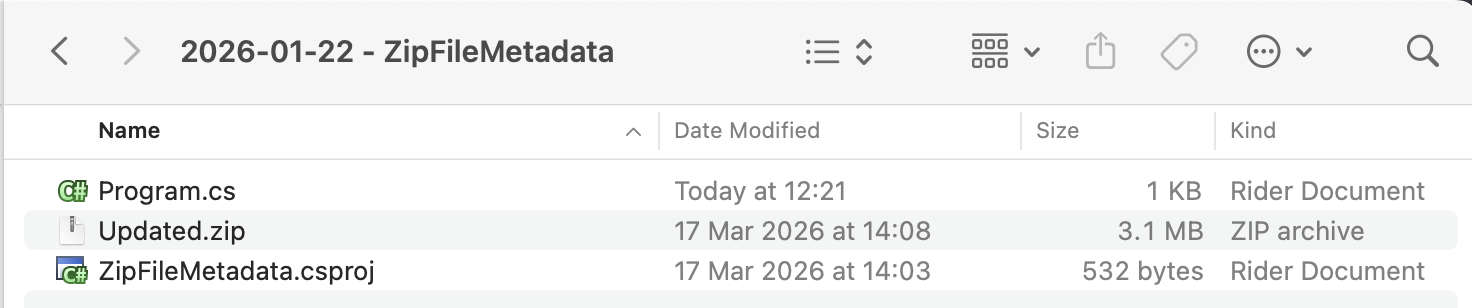
Our project structure is as follows:
To ensure the Zip file is copied to the output folder, we add the following XML tag to the .csproj.
<ItemGroup>
  <None Include="Updated.zip">
  	<CopyToOutputDirectory>PreserveNewest</CopyToOutputDirectory>
  </None>
</ItemGroup>
The code to extract and view the file contents is as follows:
using System.IO;
using System.IO.Compression;
using System.Reflection;
using Serilog;

Log.Logger = new LoggerConfiguration()
    .WriteTo.Console().CreateLogger();

// Extract the current folder where the executable is running
var currentFolder = Path.GetDirectoryName(Assembly.GetExecutingAssembly().Location)!;

// Construct the full path to the zip file
var zipFile = Path.Combine(currentFolder, "Updated.zip");

// Open the zip file on disk for update
await using (var archive = await ZipFile.OpenAsync(zipFile, ZipArchiveMode.Read))
{
    var counter = 1;
    // Loop through all the entries
    foreach (var file in archive.Entries)
    {
        // Get the file name, and skip if it is a directory
        if (file.Name == string.Empty) continue;
        Log.Information("==========================");
        Log.Information("File # {Index}", counter++);
        Log.Information("Name {FileName}", file.Name);
        Log.Information("Path {FullName}", file.FullName);
        Log.Information("Size {OriginalSize:#,0} bytes", file.Length);
        Log.Information("Compressed Size {CompressedSize:#,0} bytes", file.CompressedLength);
        Log.Information("CRC {CRC}", file.Crc32);
        Log.Information("Encrypted? {Encrypted}", file.IsEncrypted);
        Log.Information("Last Write Time {LastWriteTime:d MMM yyyy HH:mm}", file.LastWriteTime);
    }
}
A couple of things to note:
- When we open the Zip file, we specify that it is for reading purposes.
- We iterate through the Entries property, which is a collection of ZipArchiveEntry items.
- If the
ZipArchiveEntryname is blank, it is a folder. Skip and proceed to the next item. - Otherwise, extract and print the properties.
The properties available are as follows:
- Name
- FullName
- Length
- CompressedLength
- Crc32
- IsEncrypted
- LastWriteTime
If you are wondering what the difference between Name and FullName is, you can read about it here.
If we run this code, we should see the following:
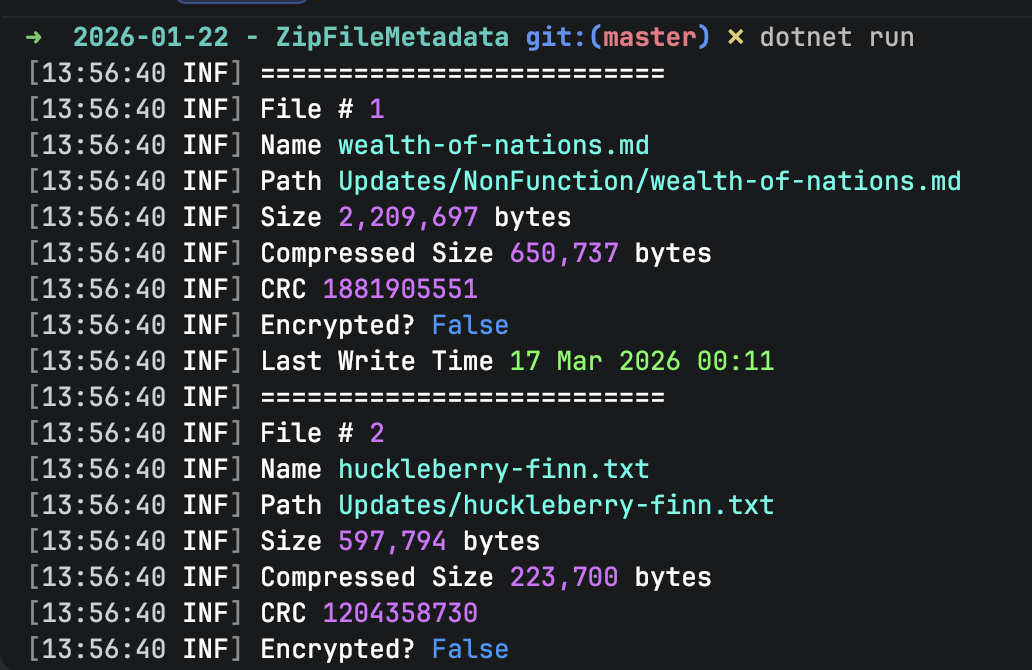
The complete output is as follows:
[13:56:40 INF] ==========================
[13:56:40 INF] File # 1
[13:56:40 INF] Name wealth-of-nations.md
[13:56:40 INF] Path Updates/NonFunction/wealth-of-nations.md
[13:56:40 INF] Size 2,209,697 bytes
[13:56:40 INF] Compressed Size 650,737 bytes
[13:56:40 INF] CRC 1881905551
[13:56:40 INF] Encrypted? False
[13:56:40 INF] Last Write Time 17 Mar 2026 00:11
[13:56:40 INF] ==========================
[13:56:40 INF] File # 2
[13:56:40 INF] Name huckleberry-finn.txt
[13:56:40 INF] Path Updates/huckleberry-finn.txt
[13:56:40 INF] Size 597,794 bytes
[13:56:40 INF] Compressed Size 223,700 bytes
[13:56:40 INF] CRC 1204358730
[13:56:40 INF] Encrypted? False
[13:56:40 INF] Last Write Time 5 Mar 2026 12:58
[13:56:40 INF] ==========================
[13:56:40 INF] File # 3
[13:56:40 INF] Name grimms-fairy-tales.txt
[13:56:40 INF] Path Updates/grimms-fairy-tales.txt
[13:56:40 INF] Size 540,174 bytes
[13:56:40 INF] Compressed Size 190,963 bytes
[13:56:40 INF] CRC 2798931834
[13:56:40 INF] Encrypted? False
[13:56:40 INF] Last Write Time 5 Mar 2026 12:59
[13:56:40 INF] ==========================
[13:56:40 INF] File # 4
[13:56:40 INF] Name alice-in-wonderland.txt
[13:56:40 INF] Path Updates/Ficton/Other/alice-in-wonderland.txt
[13:56:40 INF] Size 163,779 bytes
[13:56:40 INF] Compressed Size 59,725 bytes
[13:56:40 INF] CRC 3847061786
[13:56:40 INF] Encrypted? False
[13:56:40 INF] Last Write Time 5 Mar 2026 12:58
[13:56:40 INF] ==========================
[13:56:40 INF] File # 5
[13:56:40 INF] Name war-and-peace.txt
[13:56:40 INF] Path Updates/Ficton/Russian/war-and-peace.txt
[13:56:40 INF] Size 3,202,320 bytes
[13:56:40 INF] Compressed Size 1,193,840 bytes
[13:56:40 INF] CRC 620155665
[13:56:40 INF] Encrypted? False
[13:56:40 INF] Last Write Time 4 Mar 2026 21:04
[13:56:40 INF] ==========================
[13:56:40 INF] File # 6
[13:56:40 INF] Name brothers-karamazov.txt
[13:56:40 INF] Path Updates/Ficton/Russian/brothers-karamazov.txt
[13:56:40 INF] Size 1,995,783 bytes
[13:56:40 INF] Compressed Size 738,362 bytes
[13:56:40 INF] CRC 2615286772
[13:56:40 INF] Encrypted? False
[13:56:40 INF] Last Write Time 4 Mar 2026 21:09
TLDR
The ZipArchive class in System.IO.Compression allows you to access details of Zip files that have been added to a Zip archive.
The code is in my GitHub.
Happy hacking!