
Beware - The Folly of Default Parameters in SQL Server Stored Procedures
[C#, .NET, SQL Server]
The question of whether or not to use stored procedures in application development is one that can generate considerable heat due to the strong opinions held by the two camps:
- Never use stored procedures.
- Use stored procedures whenever possible.
And there are valid arguments for both sides.

Pros
- Logic is centralized in one place
- Issues can (often) be fixed after deployment
- An experienced DBA can assist in improving design and performance
- You have granular security control over table access and procedure execution
- Logic can be shared across applications (where applicable)
Cons
- Developers may not have access to the database (or the DBA)
- Use of constructs like loops is clunky
- Cannot leverage logic and libraries outside of what the database provides
- Version control and maintainability can be a challenge
- IDE and tooling support (refactoring, etc.) is usually a challenge
As always, I am ever the pragmatist. There are occasions when they are appropriate and when they aren’t.
Adapt accordingly.
Stored procedures are essentially logic that is stored in the database that can be called from applications.
Take this simplistic T-SQL (Microsoft SQL Server) that returns the day of the week:
CREATE OR ALTER PROC GetDayOfWeek @Day TINYINT
AS
    BEGIN
        SELECT
            CASE @Day
                WHEN 1
                    THEN
                    'Monday'
                WHEN 2
                    THEN
                    'Tuesday'
                WHEN 3
                    THEN
                    'Wednesday'
                WHEN 4
                    THEN
                    'Thursday'
                WHEN 5
                    THEN
                    'Friday'
                WHEN 6
                    THEN
                    'Saturday'
                ELSE
                    'Sunday'
            END;
    END;
You would use it like this:
EXEC GetDayOfWeek
    @Day = 3;
Which will return:
Wednesday
You can invoke this from code, using my preferred method - Dapper.
using Dapper;
using Microsoft.Data.SqlClient;

const string connection = "Data Source=;database=Spies;uid=sa;pwd=YourStrongPassword123;TrustServerCertificate=True;";

await using (var cn = new SqlConnection(connection))
{
    var result = await cn.QuerySingleAsync<string>("GetDayOfWeek", new { Day = 3 });
    Console.WriteLine(result);
}
This will print the same result.
One feature of stored procedures is that they allow you to pass default parameters. There are values that will be used if none are provided for the call.
This means you can do this:
CREATE OR ALTER PROC GetDayOfWeek @Day TINYINT = 4
AS
    BEGIN
        SELECT
            CASE @Day
                WHEN 1
                    THEN
                    'Monday'
                WHEN 2
                    THEN
                    'Tuesday'
                WHEN 3
                    THEN
                    'Wednesday'
                WHEN 4
                    THEN
                    'Thursday'
                WHEN 5
                    THEN
                    'Friday'
                WHEN 6
                    THEN
                    'Saturday'
                ELSE
                    'Sunday'
            END;
    END;
GO
4 here is the default parameter.
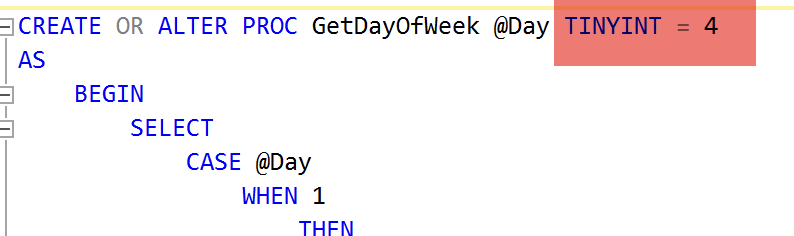
This means if you call this procedure without passing any parameters, it will use that value.
You can see where this is going.
await using (var cn = new SqlConnection(connection))
{
    var result = await cn.QuerySingleAsync<string>("GetDayOfWeek");
    Console.WriteLine(result);
}
This code will print:
Thursday
This may or may not be what you want!
If you forgot to pass the parameter, or it got deleted by accident, the procedure will always return the same result.
You may argue that this can be caught by integration tests.
It depends on the quality of the tests in question.
If the test value happens to be the default value, your test will, in fact, pass!
How to migtigate against this?
- Increase the number of test cases
- Avoid using default parameters
- Use an obvious default value that you can use to tell there is a problem
One way would be this:
CREATE OR ALTER PROC GetDayOfWeek @Day TINYINT = 8
AS
    BEGIN
        SELECT
            CASE @Day
                WHEN 1
                    THEN
                    'Monday'
                WHEN 2
                    THEN
                    'Tuesday'
                WHEN 3
                    THEN
                    'Wednesday'
                WHEN 4
                    THEN
                    'Thursday'
                WHEN 5
                    THEN
                    'Friday'
                WHEN 6
                    THEN
                    'Satruday'
                WHEN 7
                    THEN
                    'Sunday'
                ELSE
                    'This is a problem!'
            END;
    END;
GO
EXEC GetDayOfWeek
Or, more explicitly:
CREATE OR ALTER PROC GetDayOfWeek @Day TINYINT = 8
AS
    BEGIN
        IF @Day = 8
            BEGIN
                RAISERROR('Something went wrong', 16, 1);
                RETURN;
            END;
        SELECT
            CASE @Day
                WHEN 1
                    THEN
                    'Monday'
                WHEN 2
                    THEN
                    'Tuesday'
                WHEN 3
                    THEN
                    'Wednesday'
                WHEN 4
                    THEN
                    'Thursday'
                WHEN 5
                    THEN
                    'Friday'
                WHEN 6
                    THEN
                    'Satruday'
                WHEN 7
                    THEN
                    'Sunday'
            END;
    END;
GO
EXEC GetDayOfWeek;
Personally, I would prefer a combination of the latter method and robust tests.
TLDR
If you forget to pass parameters to a stored procedure and have specified default values, the procedure will run silently and successfully with those default values.
The code is in my GitHub.
Happy hacking!