
Code Housekeeping - Part 1 - Sort Code Where Applicable
[C#, Languages, CodeHouseKeeping, Code, Quality]
Code Housekeeping refers to general rules of thumb that make code easier to read, digest, and modify for other developers, yourself included.
We have all opened some code we wrote months ago and found ourselves bewildered.
Today, we look at a fairly common situation.
Suppose you have a type like this:
public class MotorCycle
{
  public string EngineType { get; set; }
  public string CoolingSystem { get; set; }
  public string CompressionRatio { get; set; }
  public string StarterType { get; set; }
  public string ClutchType { get; set; }
  public string FuelInjectionSystem { get; set; }
  public string DriveTrain { get; set; }
  public string HandlebarType { get; set; }
  public string FootpegPosition { get; set; }
  public string RiderAids { get; set; }
  public string GpsIntegration { get; set; }
  public string CruiseControl { get; set; }
  public string WindshieldType { get; set; }
  public string LuggageOptions { get; set; }
  public string GrabHandles { get; set; }
  public string HornType { get; set; }
  public string IndicatorType { get; set; }
  public string BatteryType { get; set; }
  public string ChargingSystem { get; set; }
  public string InstrumentBacklighting { get; set; }
  public string OilCapacity { get; set; }
  public string MaintenanceInterval { get; set; }
  public string WarrantyCoverage { get; set; }
  public string EmissionsStandard { get; set; }
}
As you can see, this type has many properties, and if you wanted to find one in particular, you would have to skim over all of them.
Why not make life easier for yourself, and anyone else reading this code, by sorting the properties?
public class MotorCycle
{
  public string BatteryType { get; set; }
  public string ChargingSystem { get; set; }
  public string ClutchType { get; set; }
  public string CompressionRatio { get; set; }
  public string CoolingSystem { get; set; }
  public string CruiseControl { get; set; }
  public string DriveTrain { get; set; }
  public string EmissionsStandard { get; set; }
  public string EngineType { get; set; }
  public string FootpegPosition { get; set; }
  public string FuelInjectionSystem { get; set; }
  public string GpsIntegration { get; set; }
  public string GrabHandles { get; set; }
  public string HandlebarType { get; set; }
  public string HornType { get; set; }
  public string IndicatorType { get; set; }
  public string InstrumentBacklighting { get; set; }
  public string LuggageOptions { get; set; }
  public string MaintenanceInterval { get; set; }
  public string OilCapacity { get; set; }
  public string RiderAids { get; set; }
  public string StarterType { get; set; }
  public string WarrantyCoverage { get; set; }
  public string WindshieldType { get; set; }
}
This is much easier to scan and find things.
This is also very helpful again when you are setting the properties for a large type.
var bike = new MotorCycle();

bike.EngineType = "Initial EngineType";
bike.CoolingSystem = "Initial CoolingSystem";
bike.CompressionRatio = "Initial CompressionRatio";
bike.StarterType = "Initial StarterType";
bike.ClutchType = "Initial ClutchType";
bike.FuelInjectionSystem = "Initial FuelInjectionSystem";
bike.DriveTrain = "Initial DriveTrain";
bike.HandlebarType = "Initial HandlebarType";
bike.FootpegPosition = "Initial FootpegPosition";
bike.RiderAids = "Initial RiderAids";
bike.GpsIntegration = "Initial GpsIntegration";
bike.CruiseControl = "Initial CruiseControl";
bike.WindshieldType = "Initial WindshieldType";
bike.LuggageOptions = "Initial LuggageOptions";
bike.GrabHandles = "Initial GrabHandles";
bike.HornType = "Initial HornType";
bike.IndicatorType = "Initial IndicatorType";
bike.BatteryType = "Initial BatteryType";
bike.ChargingSystem = "Initial ChargingSystem";
bike.InstrumentBacklighting = "Initial InstrumentBacklighting";
bike.OilCapacity = "Initial OilCapacity";
bike.MaintenanceInterval = "Initial MaintenanceInterval";
bike.WarrantyCoverage = "Initial WarrantyCoverage";
bike.EmissionsStandard = "Initial EmissionsStandard";
bike.HandlebarType = "Subsequent HandlebarType";
For this example, you have almost certainly not noticed that HandlebarType has been set twice.
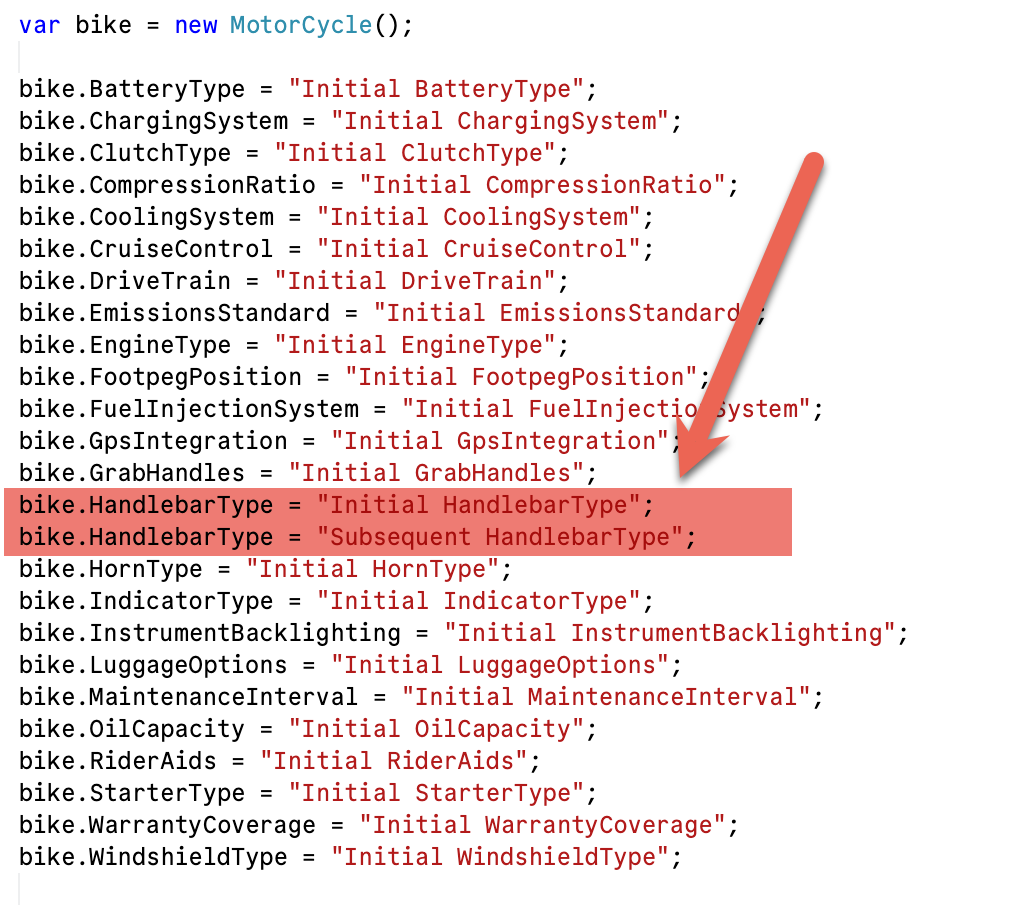
This would be much easier to catch if the code were sorted.
bike.BatteryType = "Initial BatteryType";
bike.ChargingSystem = "Initial ChargingSystem";
bike.ClutchType = "Initial ClutchType";
bike.CompressionRatio = "Initial CompressionRatio";
bike.CoolingSystem = "Initial CoolingSystem";
bike.CruiseControl = "Initial CruiseControl";
bike.DriveTrain = "Initial DriveTrain";
bike.EmissionsStandard = "Initial EmissionsStandard";
bike.EngineType = "Initial EngineType";
bike.FootpegPosition = "Initial FootpegPosition";
bike.FuelInjectionSystem = "Initial FuelInjectionSystem";
bike.GpsIntegration = "Initial GpsIntegration";
bike.GrabHandles = "Initial GrabHandles";
bike.HandlebarType = "Initial HandlebarType";
bike.HandlebarType = "Subsequent HandlebarType";
bike.HornType = "Initial HornType";
bike.IndicatorType = "Initial IndicatorType";
bike.InstrumentBacklighting = "Initial InstrumentBacklighting";
bike.LuggageOptions = "Initial LuggageOptions";
bike.MaintenanceInterval = "Initial MaintenanceInterval";
bike.OilCapacity = "Initial OilCapacity";
bike.RiderAids = "Initial RiderAids";
bike.StarterType = "Initial StarterType";
bike.WarrantyCoverage = "Initial WarrantyCoverage";
bike.WindshieldType = "Initial WindshieldType";
Most proper IDEs support this.
For JetBrains Rider, it is here:
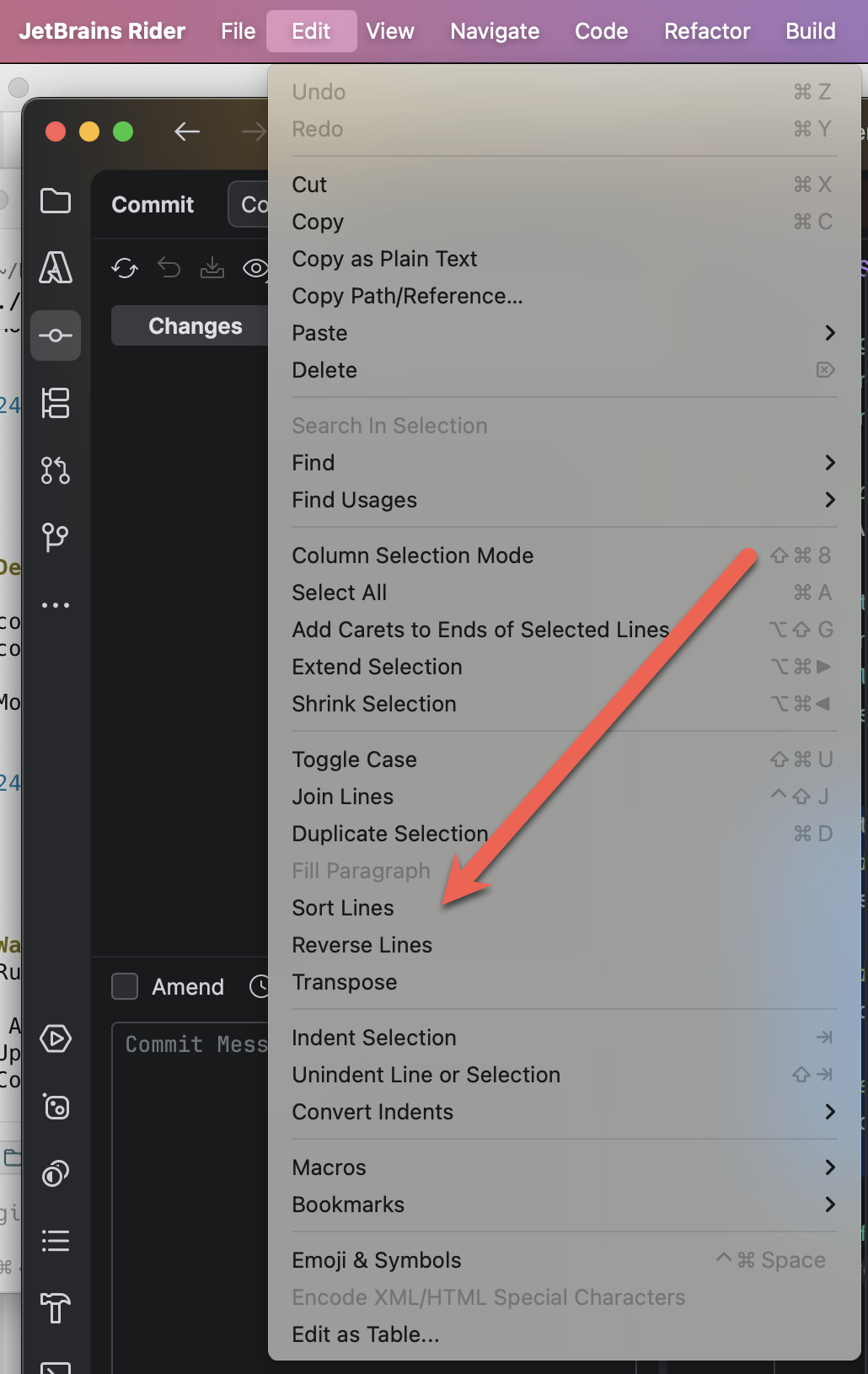
And even if your iDE does not support this natively, it probably allows you to add that support via plugins.
TLDR
Sort code wherever it is probable that it will make it easier to parse, read, understand, and modify.
Happy hacking!