Setting Up Web API Endpoints To Collectively Require Authentication In C# & .NET
[C#, ASP.NET, Security]
API authentication is almost always required to secure your API endpoints from unauthorized users.
Take this example from the post “Dynamically Changing Decimal & Thousand Separators At Runtime”;
var builder = WebApplication.CreateBuilder(args);
builder.Services.AddOptions<Settings>()
    .Bind(builder.Configuration.GetSection(nameof(Settings)))
    .ValidateDataAnnotations()
    .ValidateOnStart();

var app = builder.Build();

app.MapGet("/v1/Generate", () =>
{
    var faker = new Faker<Person>().UseSeed(0)
        .RuleFor(person => person.FirstName, faker => faker.Person.FirstName)
        .RuleFor(person => person.Surname, faker => faker.Person.LastName)
        .RuleFor(person => person.Salary, faker => faker.Random.Decimal(10_000, 99_000));
    var sb = new StringBuilder();
    foreach (var person in faker.Generate(10).ToList())
    {
        sb.AppendLine($"| {person.FirstName} | {person.Surname} | {person.Salary.ToString("0.00")} |");
    }

    return Results.Text(sb.ToString());
});

app.MapGet("/v2/Generate", () =>
{
    var french = new CultureInfo("fr-FR");
    var faker = new Faker<Person>().UseSeed(0)
        .RuleFor(person => person.FirstName, faker => faker.Person.FirstName)
        .RuleFor(person => person.Surname, faker => faker.Person.LastName)
        .RuleFor(person => person.Salary, faker => faker.Random.Decimal(10_000, 99_000));
    var sb = new StringBuilder();
    foreach (var person in faker.Generate(10).ToList())
    {
        sb.AppendLine($"| {person.FirstName} | {person.Surname} | {person.Salary.ToString("0,0.00", french)} |");
    }

    return Results.Text(sb.ToString());
});

app.MapGet("/v3/Generate", (IOptions<Settings> options) =>
{
    var settings = options.Value;
    // We are cloning an existing one instead of creating a new one
    // to avoid the need to specify all the settings.
    var numberFormatInfo = (NumberFormatInfo)
        CultureInfo.InvariantCulture.NumberFormat.Clone();
    // Set the formats
    numberFormatInfo.NumberDecimalSeparator = settings.DecimalSeparator;
    numberFormatInfo.NumberGroupSeparator = settings.ThousandSeparator;
    var faker = new Faker<Person>().UseSeed(0)
        .RuleFor(person => person.FirstName, faker => faker.Person.FirstName)
        .RuleFor(person => person.Surname, faker => faker.Person.LastName)
        .RuleFor(person => person.Salary, faker => faker.Random.Decimal(10_000, 99_000));
    var sb = new StringBuilder();
    foreach (var person in faker.Generate(10).ToList())
    {
        sb.AppendLine(
            $"| {person.FirstName} | {person.Surname} | {person.Salary.ToString("0,0.00", numberFormatInfo)} |");
    }

    return Results.Text(sb.ToString());
});

app.Run();
Suppose we wanted to secure these endpoints.
The first step would be to set up the security.
NOTE: The actual workings for this will be covered in a future post, so I am just going to set up a dummy. The exact security scheme does not matter.
// Authentication
builder.Services.AddAuthentication(JwtBearerDefaults.AuthenticationScheme)
    .AddJwtBearer(options =>
    {
        options.Authority = "https://fake-provider.com";
        options.Audience = "api";
    });
builder.Services.AddAuthorization();
The next step is to configure the endpoints to require authorization.
This is done by calling the RequireAuthorization() method for each endpoint.
app.MapGet("/v1/Generate", () =>
{
    var faker = new Faker<Person>().UseSeed(0)
        .RuleFor(person => person.FirstName, faker => faker.Person.FirstName)
        .RuleFor(person => person.Surname, faker => faker.Person.LastName)
        .RuleFor(person => person.Salary, faker => faker.Random.Decimal(10_000, 99_000));
    var sb = new StringBuilder();
    foreach (var person in faker.Generate(10).ToList())
    {
        sb.AppendLine($"| {person.FirstName} | {person.Surname} | {person.Salary.ToString("0.00")} |");
    }

    return Results.Text(sb.ToString());
}).RequireAuthorization();

app.MapGet("/v2/Generate", () =>
{
    var french = new CultureInfo("fr-FR");
    var faker = new Faker<Person>().UseSeed(0)
        .RuleFor(person => person.FirstName, faker => faker.Person.FirstName)
        .RuleFor(person => person.Surname, faker => faker.Person.LastName)
        .RuleFor(person => person.Salary, faker => faker.Random.Decimal(10_000, 99_000));
    var sb = new StringBuilder();
    foreach (var person in faker.Generate(10).ToList())
    {
        sb.AppendLine($"| {person.FirstName} | {person.Surname} | {person.Salary.ToString("0,0.00", french)} |");
    }

    return Results.Text(sb.ToString());
}).RequireAuthorization();

app.MapGet("/v3/Generate", (IOptions<Settings> options) =>
{
    var settings = options.Value;
    // We are cloning an existing one instead of creating a new one
    // to avoid the need to specify all the settings.
    var numberFormatInfo = (NumberFormatInfo)
        CultureInfo.InvariantCulture.NumberFormat.Clone();
    // Set the formats
    numberFormatInfo.NumberDecimalSeparator = settings.DecimalSeparator;
    numberFormatInfo.NumberGroupSeparator = settings.ThousandSeparator;
    var faker = new Faker<Person>().UseSeed(0)
        .RuleFor(person => person.FirstName, faker => faker.Person.FirstName)
        .RuleFor(person => person.Surname, faker => faker.Person.LastName)
        .RuleFor(person => person.Salary, faker => faker.Random.Decimal(10_000, 99_000));
    var sb = new StringBuilder();
    foreach (var person in faker.Generate(10).ToList())
    {
        sb.AppendLine(
            $"| {person.FirstName} | {person.Surname} | {person.Salary.ToString("0,0.00", numberFormatInfo)} |");
    }

    return Results.Text(sb.ToString());
}).RequireAuthorization();
This works, but:
- It is very tedious having to remember to do this for every endpoint.
- Is prone to errors - you might forget to call the method for new endpoints.
There is a better way to go about this: using MapGroup.
Instead of directly manipulating the WebApplication represented by app, we invoke MapGroup for purposes of collectively managing all the routes in our application and attach the RequireAuthorization() call at that level.
We do this as follows:
var builder = WebApplication.CreateBuilder(args);
builder.Services.AddOptions<Settings>()
    .Bind(builder.Configuration.GetSection(nameof(Settings)))
    .ValidateDataAnnotations()
    .ValidateOnStart();

// Authentication - the exact scheme does not matter for this example!
builder.Services.AddAuthentication(JwtBearerDefaults.AuthenticationScheme)
    .AddJwtBearer(options =>
    {
        options.Authority = "https://fake-provider.com";
        options.Audience = "api";
    });
builder.Services.AddAuthorization();

var app = builder.Build();
app.UseAuthorization();

// Create a group for all routes, and set to require authentication
var secured = app.MapGroup("")
    .RequireAuthorization();
The object secured here is of type RouteGroupBuilder, and that is what we actually use to define and attach our API routes.
secured.MapGet("/v1/Generate", () =>
{
    var faker = new Faker<Person>().UseSeed(0)
        .RuleFor(person => person.FirstName, faker => faker.Person.FirstName)
        .RuleFor(person => person.Surname, faker => faker.Person.LastName)
        .RuleFor(person => person.Salary, faker => faker.Random.Decimal(10_000, 99_000));
    var sb = new StringBuilder();
    foreach (var person in faker.Generate(10).ToList())
    {
        sb.AppendLine($"| {person.FirstName} | {person.Surname} | {person.Salary.ToString("0.00")} |");
    }

    return Results.Text(sb.ToString());
});

secured.MapGet("/v2/Generate", () =>
{
    var french = new CultureInfo("fr-FR");
    var faker = new Faker<Person>().UseSeed(0)
        .RuleFor(person => person.FirstName, faker => faker.Person.FirstName)
        .RuleFor(person => person.Surname, faker => faker.Person.LastName)
        .RuleFor(person => person.Salary, faker => faker.Random.Decimal(10_000, 99_000));
    var sb = new StringBuilder();
    foreach (var person in faker.Generate(10).ToList())
    {
        sb.AppendLine($"| {person.FirstName} | {person.Surname} | {person.Salary.ToString("0,0.00", french)} |");
    }

    return Results.Text(sb.ToString());
});

secured.MapGet("/v3/Generate", (IOptions<Settings> options) =>
{
    var settings = options.Value;
    // We are cloning an existing one instead of creating a new one
    // to avoid the need to specify all the settings.
    var numberFormatInfo = (NumberFormatInfo)
        CultureInfo.InvariantCulture.NumberFormat.Clone();
    // Set the formats
    numberFormatInfo.NumberDecimalSeparator = settings.DecimalSeparator;
    numberFormatInfo.NumberGroupSeparator = settings.ThousandSeparator;
    var faker = new Faker<Person>().UseSeed(0)
        .RuleFor(person => person.FirstName, faker => faker.Person.FirstName)
        .RuleFor(person => person.Surname, faker => faker.Person.LastName)
        .RuleFor(person => person.Salary, faker => faker.Random.Decimal(10_000, 99_000));
    var sb = new StringBuilder();
    foreach (var person in faker.Generate(10).ToList())
    {
        sb.AppendLine(
            $"| {person.FirstName} | {person.Surname} | {person.Salary.ToString("0,0.00", numberFormatInfo)} |");
    }

    return Results.Text(sb.ToString());
});
In this manner, all endpoints that we create from the secured class automatically require authorization.
We can, however, conditionally skip authorization for an endpoint added using the secured RouteGroupBuilder by calling the AllowAnonymous() method on the endpoint.
Like this:
secured.MapGet("/Health", () => Results.Ok()).AllowAnonymous();
We can see the effects by invoking a secured endpoint:
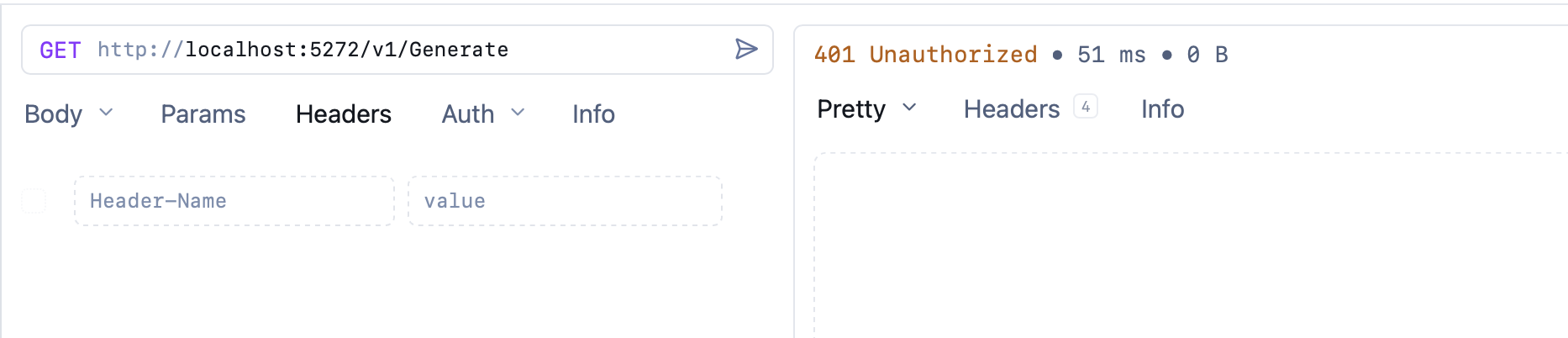
We then invoke an unsecured endpoint:
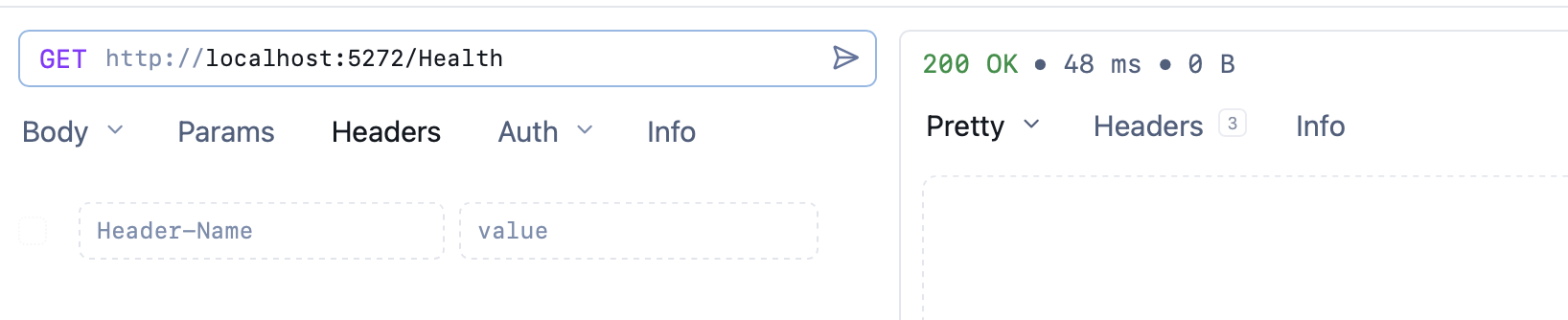
You can still add endpoints directly to app, in which case those will not require authentication.
TLDR
The MapGroup allows us to create a grouping of endpoints that can be configured together, for security or other purposes.
The code is in my GitHub.
Happy hacking!