How to Benchmark Performance Across .NET Versions
[C#, .NET, Performance]
Whenever there is a new release of .NET, one of the questions that arises is whether your application is faster or not when running under the new version.
This is the sum total of the collective improvements across APIs.
Take, for example, this method:
Guid.NewGuid();
Suppose you want to know how it performs under two different .NET versions, 9 and 10.
Given that this method is pretty fast, a rudimentary way is to generate a large number of them in a loop and time that. Compile and run against .NET 9 and then against .NET 10.
But this is cumbersome and unscientific.
A better way is to use the BenchmarkDotNet library.
First, we create our project.
dotnet new console -o GuidGen
Next, we install the library.
dotnet add package BenchmarkDotNet
Next, we change our .csproj to tell the compiler we want to target two versions of .NET.
batcat GuidGen.csproj -p
<Project Sdk="Microsoft.NET.Sdk">

  <PropertyGroup>
    <OutputType>Exe</OutputType>
    <TargetFrameworks>net10.0;net90</TargetFrameworks>
    <ImplicitUsings>enable</ImplicitUsings>
    <Nullable>enable</Nullable>
  </PropertyGroup>

  <ItemGroup>
    <PackageReference Include="BenchmarkDotNet" Version="0.15.8" />
  </ItemGroup>

</Project>
The magic is happening here:
<TargetFrameworks>net10.0;net90</TargetFrameworks>
For this to work, you must have the SDKs of the versions you intend to run against installed.
You can verify as follows;
dotnet --list-sdks
This should print the following:
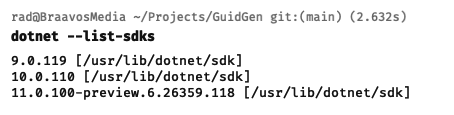
Here, you can see I have 3 versions of .NET installed.
Our next order of business is to write our benchmark. We typically do this in a class and expose our benchmark as a method of the class, which tells the runner what exactly we are benchmarking.
public class GuidGenerator
{
  [Benchmark]
  public Guid Generate() => Guid.NewGuid();
}
Here, we can see that what we are benchmarking is the Generate() method.
Next, we indicate that we want to benchmark our code across .NET versions. This is achieved using the SimpleJob attribute, specifying the version we want using the RuntimeMoniker as appropriate.
[SimpleJob(RuntimeMoniker.Net10_0)]
[SimpleJob(RuntimeMoniker.Net90)]
public class GuidGenerator
{
    [Benchmark]
    public Guid Generate() => Guid.NewGuid();
}
Additionally, we typically want to indicate what we consider the baseline against which comparisons are run.
In this case, since we want to know if performance has improved, we set the baseline to .NET 9 by indicating the same in the attribute.
[SimpleJob(RuntimeMoniker.Net10_0)]
[SimpleJob(RuntimeMoniker.Net90, baseline: true)]
public class GuidGenerator
{
  [Benchmark]
  public Guid Generate() => Guid.NewGuid();
}
Finally, in the main program, we wire the benchmark runner, like so:
BenchmarkRunner.Run<GuidGenerator>();
We are calling the generic static Run method of the BenchmarkRunner, telling it the class containing our Benchmark.
Finally, we run our benchmarks like so:
dotnet run -c Release
You must run in the release configuration - it will literally not run if you don’t specify as much.
If all goes well, you should see the following at the bottom of a lot of generated results:
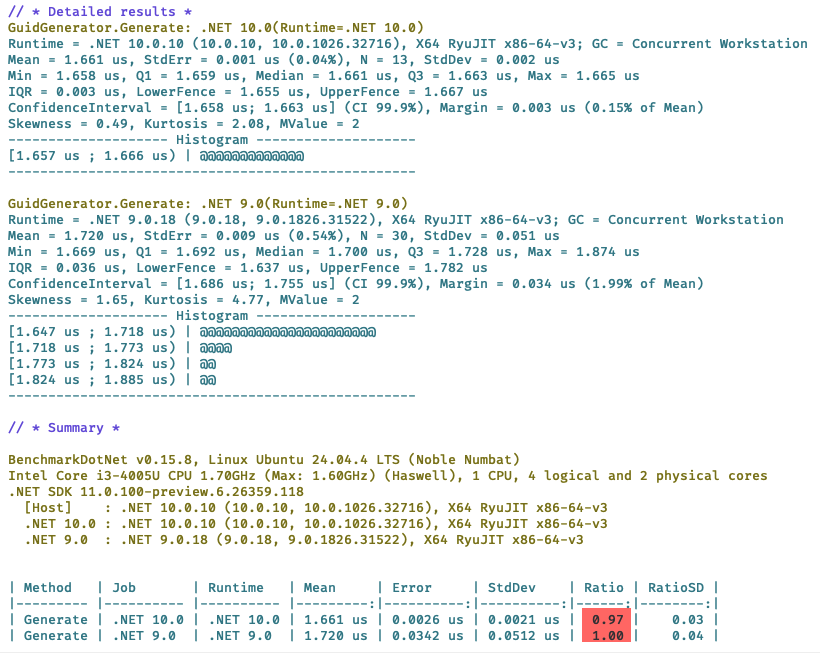
Here we can see that the method in .NET 10 is 3% faster than .NET 9.
You can also see I am running this benchmark on Ubuntu Linux 24.04 on a machine with 1 CPU, 2 physical and 4 logical cores.
TLDR
BenchmarkDot net allows you to compare performance across .NET versions using the Benchmark attribute.
The code is in my GitHub.
Happy hacking!