Connecting To MySQL & MariaDB using MySQLConnector in C# & .NET
[MySQL, MariaDB, Database, C#, .NET]
When it comes to working with MySQL and MariaDB in C# & any of the languages on the .NET platform, the first port of call is which managed drivers to use.
Here, we have a number of choices:
| Driver | Comments |
|---|---|
| MySqlConnector | De facto standard, officially supporting MySQL and MariaDB |
| MySql.Data | Official driver maintained by Oracle |
| DevArt.Data.MySQL | Commercial driver |
In this post, we will look at how to use the MySQLConnector package.
Create a new project and then add the MySqlConnector package as follows:
dotnet add package MySqlConnector
We then write some code to connect to the database and fetch the current date and time.
using System.Data;
using MySqlConnector;

const string connectionString = "Server=localhost;userid=root;password=mystrongpassword123;database=testdb";

using (var cn = new MySqlConnection(connectionString))
{
    // Open the connection
    cn.Open();
    // Create a command object
    using (var cmd = cn.CreateCommand())
    {
        // Query the current date and time
        cmd.CommandText = "Select CURRENT_TIMESTAMP";
        // Get the result from command execution
        DateTime result = (DateTime)cmd.ExecuteScalar()!;
        // Write to console
        Console.WriteLine(result);
    }

    cn.Close();
}
You can also do it this way, though it is more unwieldy.
using System.Data;
using MySqlConnector;

const string connectionString = "Server=localhost;userid=root;password=mystrongpassword123;database=testdb";
using (var cn = new MySqlConnection(connectionString))
{
    // Open the connection
    cn.Open();
    // Create a command object
    using (var cmd = cn.CreateCommand())
    {
        // Query the current date and time
        cmd.CommandText = "Select CURRENT_TIMESTAMP";
        // Get a reader, specifying to close the connection when done
        using (var reader = cmd.ExecuteReader(CommandBehavior.CloseConnection))
        {
            // Fetch the date and time
            while (reader.Read())
            {
                // Write to console
                Console.WriteLine(reader.GetDateTime(0));
            }

            // Close the read
            reader.Close();
        }
    }
}
A benefit of this package is its support for asynchronous operation.
So you can rewrite the previous samples.
The scalar version:
await using (var cn = new MySqlConnection(connectionString))
{
    // Open the connection
    await cn.OpenAsync();
    // Create a command object
    await using (var cmd = cn.CreateCommand())
    {
        // Query the current date and time
        cmd.CommandText = "Select CURRENT_TIMESTAMP";
        // Get the result from command execution
        DateTime result = (DateTime)(await cmd.ExecuteScalarAsync())!;
        // Write to console
        Console.WriteLine(result);
    }

    await cn.CloseAsync();
}
The reader version
using (var cn = new MySqlConnection(connectionString))
{
    // Open the connection
    await cn.OpenAsync();
    // Create a command object
    using (var cmd = cn.CreateCommand())
    {
        // Query the current date and time
        cmd.CommandText = "Select CURRENT_TIMESTAMP";
        // Get a reader, specifying to close the connection when done
        await using (var reader = await cmd.ExecuteReaderAsync(CommandBehavior.CloseConnection))
        {
            // Fetch the date and time
            while (await reader.ReadAsync())
            {
                // Write to console
                Console.WriteLine(reader.GetDateTime(0));
            }

            // Close the read
            await reader.CloseAsync();
        }
    }
}
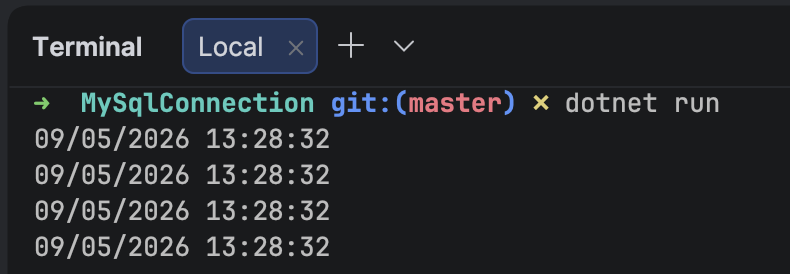
If we run this program, we should get something like this in the console:
TLDR
You can use the MySqlConnector to connect to MySQL and MariaDB databases.
The code is in my GitHub.
Happy hacking!