How to Benchmark Performance Against Preview Versions of .NET
[C#, .NET, Performance]
Yesterday’s post, “How to Benchmark Performance Across .NET Versions”, looked at how to compare the performance of code across .NET versions using the BenchmarkDotNet library.
It hinged on decorating the class hosting the benchmark with the SimpleJob attribute, which we use to specify the .NET version we want to run against using the RuntimeMoniker enum.
[SimpleJob(RuntimeMoniker.Net10_0)]
[SimpleJob(RuntimeMoniker.Net90, baseline: true)]
public class GuidGenerator
{
  [Benchmark]
  public Guid Generate() => Guid.NewGuid();
}
This, however, presents a challenge: BenchmarkDotNet needs to know about the .NET versions you want to test against beforehand.
What happens, as is the case now, when BenchmarkDotNet doesn’t know about the version we want to benchmark - .NET 11?
There is no RuntimeMoniker.NET11_0. At least not yet.
So what do we do in this situation?
Luckily, there is a solution.
You need to subclass the ManualConfig class and, within your implementation, specify the frameworks you want included in the constructor, as follows:
public sealed class BenchmarkConfig : ManualConfig
{
    public BenchmarkConfig()
    {
        // This is normal .NET 10
        AddJob(
            Job.Default
                .WithToolchain(
                    CsProjCoreToolchain.From(NetCoreAppSettings.NetCoreApp10_0))
                .WithId("net10")
                .AsBaseline());

        // This is .NET 11
        AddJob(
            Job.Default
                .WithToolchain(
                    CsProjCoreToolchain.From(
                        new NetCoreAppSettings(
                            targetFrameworkMoniker: "net11.0",
                            runtimeFrameworkVersion: null,
                            name: ".NET 11")))
                .WithId("net11"));
    }
}
Note here that I am specifying .NET as the baseline here:
.WithId("net10")
	.AsBaseline());
Next, we decorate our Benchmark class with a typed Config attribute of our class, like so:
[Config(typeof(BenchmarkConfig))]
public class GuidGenerator
{
    [Benchmark]
    public Guid Generate() => Guid.NewGuid();
}
This will instruct our benchmark runner how to find and launch the desired .NET versions.
Now, we can run the benchmark.
dotnet run -c=Release
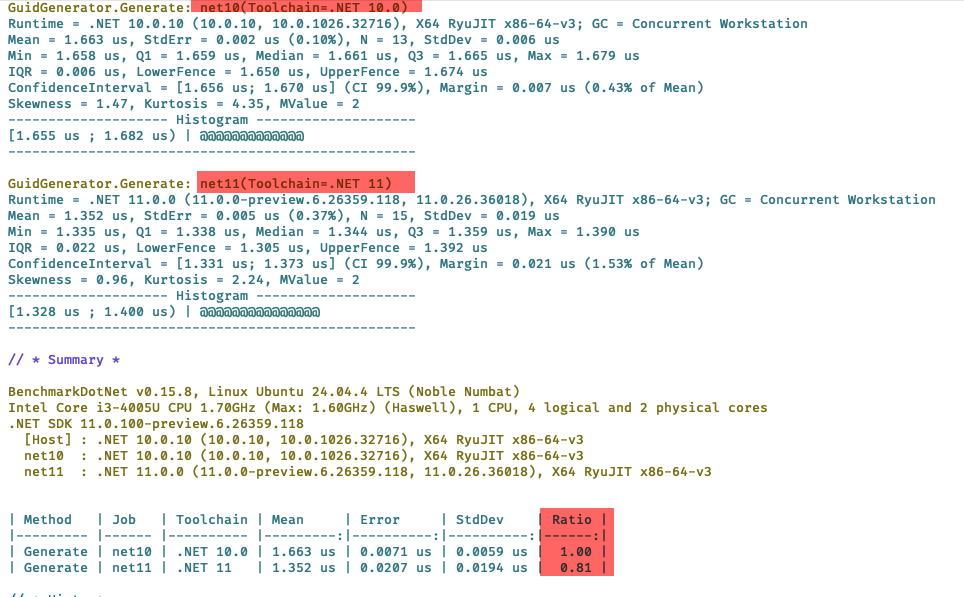
Here we can see a couple of things:
- The runner was able to load both toolchains - .NET 10 and .NET 11
- It was able to benchmark both versions
- Guid generation is 20% faster in .NET 11 compared to .NET 10.
TLDR
You can run benchmarks against .NET versions BenchmarkDotNet is unaware of by subclassing and implementing the ManualConfig class.
The code is in my GitHub.
Happy hacking!