Tip - How To Embed Video In Jekyll And HTML
[Jekyll, HTML]
In our previous post, “Tip - How To Quickly Move Lines In Your .NET IDE”, we looked at how to move lines of text in your IDE.
At the bottom, I embedded a video of the tip.
I had an option to use a GIF, but even after generating one, I decided against it for the following reasons:
- The GIF was of noticeably lower quality
- Video allowed for better quality
- Video allowed configuration of controls to play/pause the content
How do you do it?
Embed video using the video tag.
The markup is as follows:
<video controls>
<source src="../images/2026/05/ALTMoveText.mp4"/>
</video>
A couple of things to note:
- The path to the source video is relative
- The
controlsattribute specifies that the browser renders various UI elements to control the video like play/pause toggles.
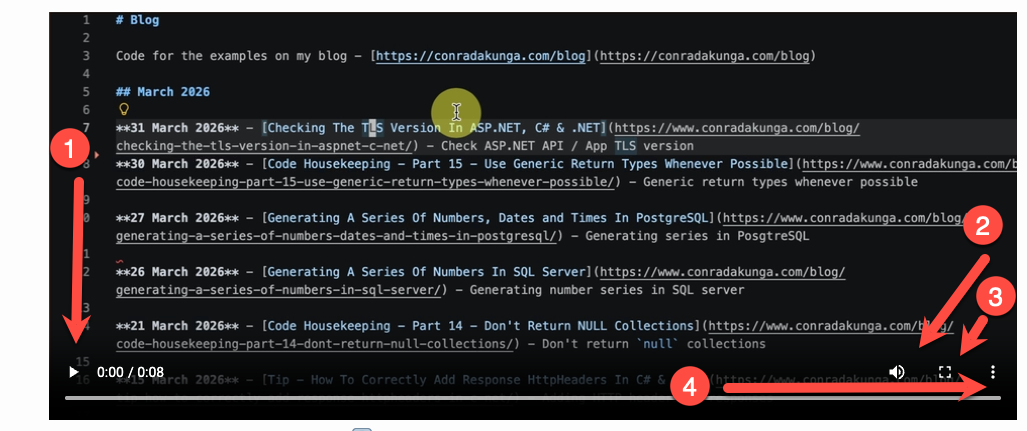
- This is the play button that toggles to pause
- This is the volume control
- This fills the screen with the video
- Additional options
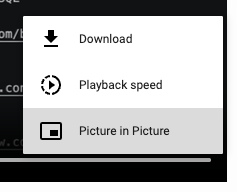
I think this gives users a better experience than a plain GIF.
TLDR
Use the video tag to embed videos in HTML & Jekyll
Happy hacking!