Connecting To MySQL & MariaDB using MySql.Data in C# & .NET
[MySQL, MariaDB, Database, C#, .NET]
When it comes to working with MySQL and MariaDB in C# & any of the languages on the .NET platform, the first port of call is which managed drivers to use.
Here, we have a number of choices:
| Driver | Comments |
|---|---|
| MySqlConnector | De facto standard, officially supporting MySQL and MariaDB |
| MySql.Data | Official driver maintained by Oracle |
| DevArt.Data.MySQL | Commercial driver |
In our previous post, “Connecting To MySQL & MariaDB using MySQLConnector in C# & .NET”, we looked at how to connect to MySQL or MariaDB database from a .NET application using the MySQLConnector ADO.NET driver
In this post, we will look at how to use the MySql.Data package, the official driver built and maintained by Oracle.
Create a new project and then add the MySql.Data package as follows:
dotnet add package MySql.Data
We then write some code to connect to the database and fetch the current date and time.
using System.Data;
using MySql.Data.MySqlClient;

const string connectionString = "Server=localhost;userid=root;password=mystrongpassword123;database=testdb";

using (var cn = new MySqlConnection(connectionString))
{
    // Open the connection
    cn.Open();
    // Create a command object
    using (var cmd = cn.CreateCommand())
    {
        // Query the current date and time
        cmd.CommandText = "Select CURRENT_TIMESTAMP";
        // Get the result from command execution
        DateTime result = (DateTime)cmd.ExecuteScalar()!;
        // Write to console
        Console.WriteLine(result);
    }

    cn.Close();
}
You can also do it this way, though it is more unwieldy.
using System.Data;
using MySql.Data.MySqlClient;

const string connectionString = "Server=localhost;userid=root;password=mystrongpassword123;database=testdb";
using (var cn = new MySqlConnection(connectionString))
{
    // Open the connection
    cn.Open();
    // Create a command object
    using (var cmd = cn.CreateCommand())
    {
        // Query the current date and time
        cmd.CommandText = "Select CURRENT_TIMESTAMP";
        // Get a reader, specifying to close the connection when done
        using (var reader = cmd.ExecuteReader(CommandBehavior.CloseConnection))
        {
            // Fetch the date and time
            while (reader.Read())
            {
                // Write to console
                Console.WriteLine(reader.GetDateTime(0));
            }

            // Close the read
            reader.Close();
        }
    }
}
A benefit of this package is its support for asynchronous operation.
So you can rewrite the previous samples.
The scalar version:
await using (var cn = new MySqlConnection(connectionString))
{
    // Open the connection
    await cn.OpenAsync();
    // Create a command object
    await using (var cmd = cn.CreateCommand())
    {
        // Query the current date and time
        cmd.CommandText = "Select CURRENT_TIMESTAMP";
        // Get the result from command execution
        DateTime result = (DateTime)(await cmd.ExecuteScalarAsync())!;
        // Write to console
        Console.WriteLine(result);
    }

    await cn.CloseAsync();
}
The reader version
using (var cn = new MySqlConnection(connectionString))
{
    // Open the connection
    await cn.OpenAsync();
    // Create a command object
    using (var cmd = cn.CreateCommand())
    {
        // Query the current date and time
        cmd.CommandText = "Select CURRENT_TIMESTAMP";
        // Get a reader, specifying to close the connection when done
        await using (var reader = await cmd.ExecuteReaderAsync(CommandBehavior.CloseConnection))
        {
            // Fetch the date and time
            while (await reader.ReadAsync())
            {
                // Write to console
                Console.WriteLine(reader.GetDateTime(0));
            }

            // Close the read
            await reader.CloseAsync();
        }
    }
}
If we run this program, we should get something like this in the console:
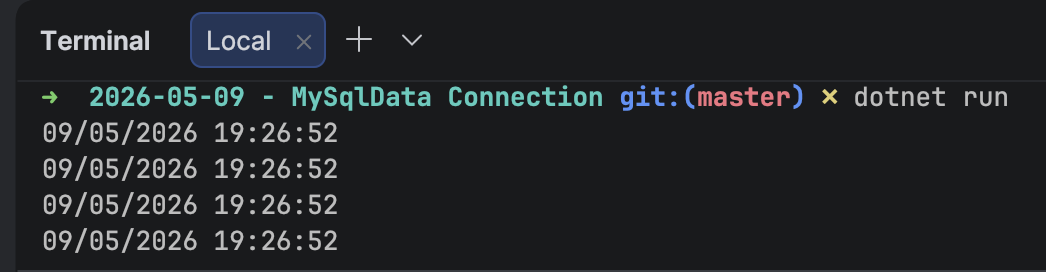
You will note that the code is identical to that in the previous post.
TLDR
You can use the MySql.Data to connect to MySQL and MariaDB databases.
The code is in my GitHub.
Happy hacking!