This is Part 24 of a series on Designing, Building & Packaging A Scalable, Testable .NET Open Source Component.
In the last post in the series, we looked at how to refactor the AmazonStorageEngine for asynchronous initialization.
This post will implement storage on Google Cloud Storage - the GoogleCloudStorageEngine, completing support for all the major cloud providers - Microsoft Azure Blob Storage, Amazon S3, and Google Cloud Storage.
The first step is to understand the Google Cloud product we will use for storage: Google Cloud Storage.
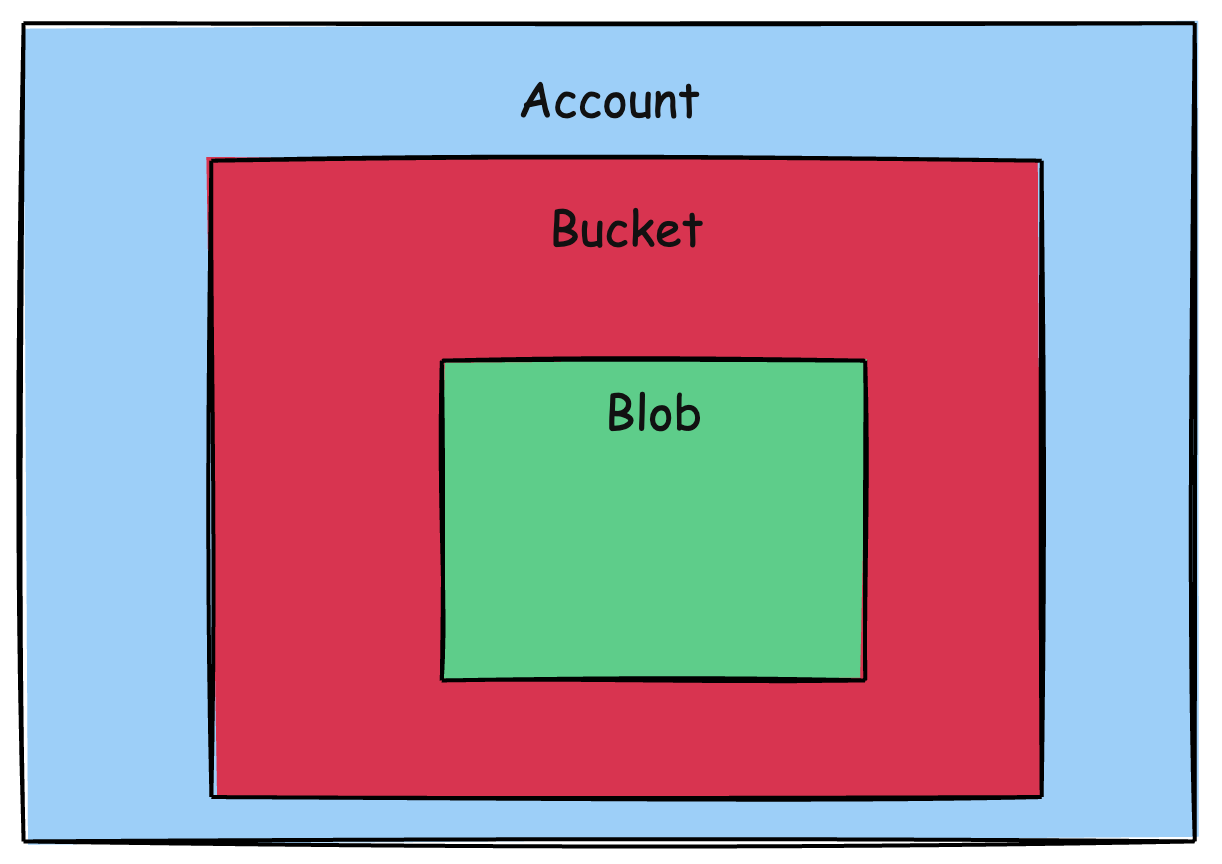
The main concepts we will deal with are:
This is the top level. It is accessed and manipulated using the StorageClient.
This level is the equivalent of a directory.
An account can have more than one bucket. Objects are stored in the buckets.
Like our other storage engines, we will have two buckets - one to store the file data, and another to store the file metadata.
We will begin by implementing a class to store some preliminary settings (likely to change to factor in additional GCP concerns like authentication)
public class GoogleSettings
{
    [Required] public string ProjectID { get; set; } = null!;
    [Required] public string BucketLocation { get; set; } = null!;
}
Next, we begin to implement the GoogleCloudStorageEngine.
public sealed class GoogleCloudStorageEngine : IStorageEngine
{
  private readonly string _dataContainerName;
  private readonly string _metadataContainerName;
  private readonly StorageClient _client;

  private GoogleCloudStorageEngine(string accessToken, string dataContainerName,
  string metadataContainerName)
  {
    // Configuration for the Google client
    var credential = GoogleCredential.FromAccessToken(accessToken);

    _dataContainerName = dataContainerName;
    _metadataContainerName = metadataContainerName;
    _client = StorageClient.Create(credential);
  }
}
We next need to implement an Initialization method that will create our buckets if they don’t already exist. This will be run once, perhaps at startup so that the GoogleCloudStorageEngine will always find the buckets when it needs them.
public static async Task<GoogleCloudStorageEngine> InitializeAsync(string accessToken, GoogleSettings settings,
    string dataContainerName,
    string metadataContainerName,
    CancellationToken cancellationToken = default)
{
    var engine = new GoogleCloudStorageEngine(accessToken, dataContainerName,
        metadataContainerName);

    var client = await StorageClient.CreateAsync(GoogleCredential.FromAccessToken(accessToken));

    // Check if the metadata bucket exists
    try
    {
        await client.GetBucketAsync(metadataContainerName, cancellationToken: cancellationToken);
    }
    catch (GoogleApiException ex) when (ex.HttpStatusCode == HttpStatusCode.NotFound)
    {
        await client.CreateBucketAsync(settings.ProjectID, new Bucket
        {
            Name = metadataContainerName,
            Location = settings.BucketLocation,
            StorageClass = StorageClasses.Standard
        }, cancellationToken: cancellationToken);
    }

    // Check if the data bucket exists
    try
    {
        await client.GetBucketAsync(dataContainerName, cancellationToken: cancellationToken);
    }
    catch (GoogleApiException ex) when (ex.HttpStatusCode == HttpStatusCode.NotFound)
    {
        await client.CreateBucketAsync(settings.ProjectID, new Bucket
        {
            Name = dataContainerName,
            Location = settings.BucketLocation,
            StorageClass = StorageClasses.Standard
        }, cancellationToken: cancellationToken);
    }

    return engine;
}
We then go on to implement the various methods of the IStorageEngine interface.
First, a method that checks if a given FileID exists in a specified bucket:
private async Task<bool> FileExistsAsync(Guid fileId, string containerName,
    CancellationToken cancellationToken = default)
{
    try
    {
        await _client.GetObjectAsync(containerName, fileId.ToString(), cancellationToken: cancellationToken);
        return true;
    }
    catch (GoogleApiException ex) when (ex.HttpStatusCode == HttpStatusCode.NotFound)
    {
        return false;
    }
}
Next, StoreFileAsync:
public async Task<FileMetadata> StoreFileAsync(FileMetadata metaData, Stream data,
    CancellationToken cancellationToken = default)
{
    // Upload the data and the metadata in parallel
    await Task.WhenAll(
        _client.UploadObjectAsync(_metadataContainerName, objectName: metaData.FileId.ToString(),
            MediaTypeNames.Application.Json,
            source: new MemoryStream(Encoding.UTF8.GetBytes(JsonSerializer.Serialize(metaData))),
            cancellationToken: cancellationToken),
        _client.UploadObjectAsync(_dataContainerName, objectName: metaData.FileId.ToString(),
            null, source: data, cancellationToken: cancellationToken));
    return metaData;
}
Next, GetMetadataAsync:
public async Task<FileMetadata> GetMetadataAsync(Guid fileId, CancellationToken cancellationToken = default)
{
    //Verify file exists
    if (!await FileExistsAsync(fileId, _metadataContainerName, cancellationToken))
        throw new FileNotFoundException($"File {fileId} not found");

    // Retrieve the data
    using var memoryStream = new MemoryStream();
    await _client.DownloadObjectAsync(_metadataContainerName, fileId.ToString(), memoryStream,
        cancellationToken: cancellationToken);
    memoryStream.Position = 0;

    using var reader = new StreamReader(memoryStream);
    var content = await reader.ReadToEndAsync(cancellationToken);
    return JsonSerializer.Deserialize<FileMetadata>(content) ?? throw new FileNotFoundException();
}
Next, GetFileAsync:
public async Task<Stream> GetFileAsync(Guid fileId, CancellationToken cancellationToken = default)
{
    //Verify file exists
    if (!await FileExistsAsync(fileId, _dataContainerName, cancellationToken))
        throw new FileNotFoundException($"File {fileId} not found");

    var memoryStream = new MemoryStream();
    await _client.DownloadObjectAsync(_dataContainerName, fileId.ToString(), memoryStream,
        cancellationToken: cancellationToken);
    memoryStream.Position = 0;
    return memoryStream;
}
Next, DeleteFileAsync:
public async Task DeleteFileAsync(Guid fileId, CancellationToken cancellationToken = default)
{
  //Verify file exists
  if (!await FileExistsAsync(fileId, _dataContainerName, cancellationToken))
      throw new FileNotFoundException($"File {fileId} not found");

  // Delete metadata and data in parallel
  await Task.WhenAll(
      _client.DeleteObjectAsync(_metadataContainerName, fileId.ToString(), cancellationToken: cancellationToken),
      _client.DeleteObjectAsync(_dataContainerName, fileId.ToString(), cancellationToken: cancellationToken));
}
In our next post, we will look at how to test this locally.
Note, however, we have not yet tested against the actual Google Cloud Storage, which will likely require some modifications to our configuration of the client, as well as authentication.
In this post, we implemented a storage engine for Google Cloud Storage, GoogleCloudStorageEngine
The code is in my GitHub.
Happy hacking!