Interfacing With MySQL & MariaDB Databases using Dapper in C# & .NET
[Database - MySQL - MariaDB - C# - .NET]
In our previous post, “Interfacing With MySQL & MariaDB Databases in C# & .NET”, we looked at how to interface with MySQL and MariaDB using the ADO.NET primitives - Connections, Commands and Parameters using either of the MySQL providers.
In this post we will look at how to realize the same using Dapper, a library we have talked about extensively.
- Insert
- List
- Update
- Delete
For this set of exercises, we will use a table with the following schema:
CREATE TABLE spies (
  spyid int NOT NULL AUTO_INCREMENT,
  fullnames varchar(100) not null,
  dateofbirth datetime not null
  PRIMARY KEY (spyid),
  UNIQUE KEY spies_uq_fullnames (fullnames)
)
We will use the following type:
public sealed class Spy
{
    public required int spyID { get; init; }
    public required string Fullnames { get; init; }
    public required DateOnly DateOfBirth { get; init; }
}
Insert
The process here is:
- Create a
MySqlConnection - Create a
DynamicParametersobject, specifying the insert values - Run
ExecuteAsyncon theMySqlConnection, providing a query and theDynamicParametersobject.
The code is as follows:
// Configure a faker
var faker = new Faker<Spy>()
    .RuleFor(f => f.Fullnames, f => f.Person.FullName)
    .RuleFor(f => f.DateOfBirth, f => f.Date.Past(50));

await using (var cn = new MySqlConnection(connectionString))
{
    // Generate a new spy
    var spy = faker.Generate();
    // Create the Dapper dynamic parameters
    var param = new DynamicParameters();
    param.Add("fullnames", spy.Fullnames);
    param.Add("dateofbirth", spy.DateOfBirth);

    Log.Information("Creating a spy with name {Fullnames}, Date Of Birth: {DateOfBirth}", spy.Fullnames,
        spy.DateOfBirth);
    // Execute query
    const string query = "INSERT spies (fullnames,dateofbirth) values (@fullnames,@dateofbirth)";
    var result = await cn.ExecuteAsync(query, param);
    Log.Information("{Count} records affected", result);
}
List
For the list process:
- Create a
MySqlConnection - Run the generic
QueryAsyncon theMySqlConnection, providing a query
This code will return a list of Spy objects.
var spies = new List<Spy>();

await using (var cn = new MySqlConnection(connectionString))
{
    spies = (await cn.QueryAsync<Spy>("SELECT spyid, fullnames,dateofbirth FROM spies")).AsList();
    spies.ForEach(spy =>
        Log.Information("ID: {ID}, Fullname: {Fullnames}, DateOfBirth: {DateOfBirth}",
            spy.spyID, spy.Fullnames,
            spy.DateOfBirth));
}

Log.Information("{Count} records returned", spies.Count);
Update
The process here is the same as that for Insert:
- Create a
MySqlConnection - Create a
DynamicParametersobject, specifying the insert values - Run
ExecuteAsyncon theMySqlConnection, providing a query and theDynamicParametersobject.
The code is as follows:
await using (var cn = new MySqlConnection(connectionString))
{
    // Generate a new spy
    var spy = faker.Generate();
    //Create the Dapper dynamic parameters
    var param = new DynamicParameters();
    param.Add("fullnames", spy.Fullnames);
    param.Add("dateofbirth", spy.DateOfBirth);
    param.Add("spyid", spyID);
    const string query = "UPDATE spies SET fullnames=@fullnames, dateofbirth=@dateofBirth WHERE spyid=@spyid";
    Log.Information("Updating spy fullname and date of birth to {Fullnames} and {DateOfBirth}", spy.Fullnames,
        spy.DateOfBirth);
    // Execute the query
    var result = await cn.ExecuteAsync(query, param);
    Log.Information("{Count} records affected", result);
Delete
The process here is the same as that for Insert and Update:
- Create a
MySqlConnection - Create a
DynamicParametersobject, specifying theSpyIDto delete - Run
ExecuteAsyncon theMySqlConnection, providing a query and theDynamicParametersobject.
await using (var cn = new MySqlConnection(connectionString))
{
    var param = new DynamicParameters();
    param.Add("spyid", spyID);
    const string query = "DELETE from spies WHERE spyid=@spyid";
    Log.Information("Deleting spy with ID {ID}", spyID);
    // Execute query
    var result = await cn.ExecuteAsync(query, param);
    Log.Information("{Count} records affected", result);
}
Running the entire program yields the following:
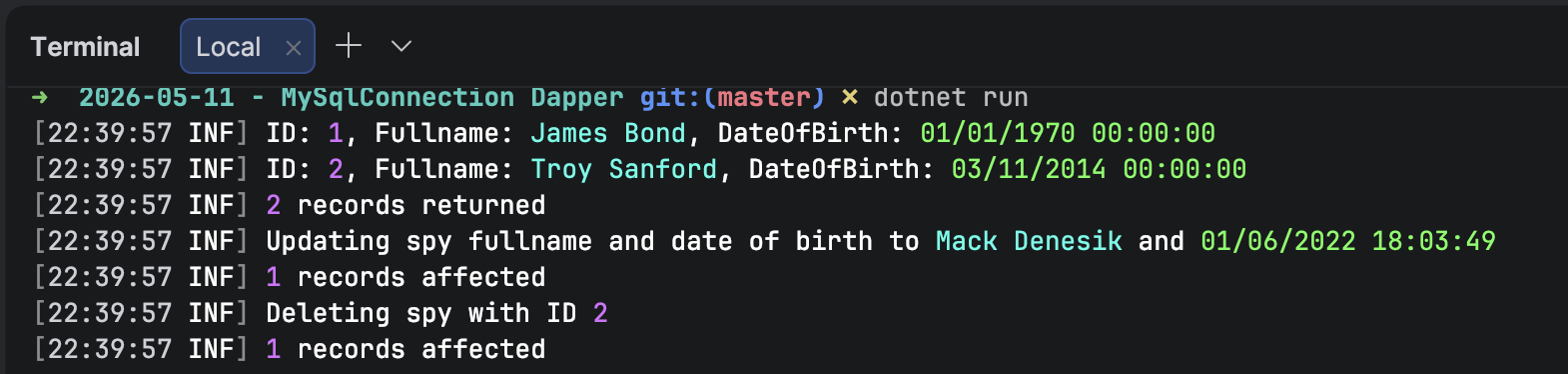
We can see here that there is considerably less code, making it easier to maintain.
TLDR
Dapper can drastically simplify working with MySQL and MariaDB.
The code is in my GitHub.
Happy hacking!