Sending Email In C# & .NET - Part 12 - Sending Email With Attachments Using MailKit
[C#, .NET, Email, StarLibrary, MailKit]
This is Part 12 of a series on sending email.
- Sending Email in C# & .NET - Part 1 - Introduction
- Sending Email in C# & .NET - Part 2 - Delivery
- Sending Email in C# & .NET - Part 3 - Using Gmail
- Sending Email In C# & .NET - Part 4 - Using Office 365 & MS Graph API
- Sending Email In C# & .NET - Part 5 - Using Google Cloud API
- Sending Email In C# & .NET - Part 6 - Testing SMTP Locally Using PaperCut
- Sending Email In C# & .NET - Part 7 - Sending Inline Images Using SMTP
- Sending Email In C# & .NET - Part 8 - Sending HTML Email Using SMTP
- Sending Email In C# & .NET - Part 9 - Sending Multiple Format Email Using SMTP
- Sending Email In C# & .NET - Part 10 - Sending Plain Text Email Using MailKit
- Sending Email In C# & .NET - Part 11 - Sending HTML Email Using MailKit
- Sending Email In C# & .NET - Part 12 - Sending Email With Attachments Using MailKit (This post)
- Sending Email In C# & .NET - Part 13 - Sending Email With Inline Attachments Using MailKit
- Sending Email In C# & .NET - Part 14 - Sending Multiple Format Email Using MailKit
- Sending Email In C# & .NET - Part 15 - Sending Calendar Invites Using MailKit
- Sending Email In C# & .NET - Part 16 - Testing SMTP Locally Using Mailpit
Our last post, “Sending Email In C# & .NET - Part 11 - Sending HTML Email Using MailKit”, looked at how to send HTML email using MailKit.
In this post, we will look at how to send an email with attachments.
The process is as follows:
- Create a
MimeMessage - Create one (or more)
MailboxAddressfor the recipients and add to theTocollection of theMimeMessage - Create one
MailboxAddressfor the sender and add it to theFromcollection of theMimeMessage - Set the
Subjectof theMimeMessage - Create a
TextPartfor the email body. - Create a
MimePartfor the attachment - Create a
Multipart(mixed), to which we add theTextPartand theMimePart. - Set the message
Bodyto be theMultipart. - Send the message using the
SmtpClient. This is theSmtpClientfromMailKit, not the one in System.Net.
The code is as follows:
using MailKit.Net.Smtp;
using MimeKit;
using Serilog;

// Configure logging to the console
Log.Logger = new LoggerConfiguration()
    .WriteTo.Console()
    .CreateLogger();

// Create the email
var message = new MimeMessage();
// Add the sender
message.From.Add(new MailboxAddress("James Bond", "james@mi5.org"));
// Set the recipient
message.To.Add(new MailboxAddress("M", "m@mi5.org"));
// Set the email subject
message.Subject = "Mission Listing";

// Create the text body
var textBody = new TextPart("plain")
{
    Text = """
           Dear M,

           As requested, kindly find attached a list of the missions I have carried
           out since you took over command.

           Warmest regards
           """
};

// create the attachment
var attachment = new MimePart("text", "plain")
{
    Content = new MimeContent(File.OpenRead("Missions.txt")),
    ContentDisposition = new ContentDisposition(ContentDisposition.Attachment),
    ContentTransferEncoding = ContentEncoding.Base64,
    FileName = "Missions.txt"
};

// Create a container for the body text & attachment
var parts = new Multipart("mixed");
parts.Add(textBody);
parts.Add(attachment);

// Set the body
message.Body = parts;

// Now send the email
using (var client = new SmtpClient())
{
    Log.Information("Connecting to smtp server...");
    await client.ConnectAsync("localhost", 25, false);
    // Typically, authenticate here. But we are using PaperCut
    //await client.AuthenticateAsync("username", "password");
    await client.SendAsync(message);
    Log.Information("Sent message");
    await client.DisconnectAsync(true);
    Log.Information("Disconnected from server");
}
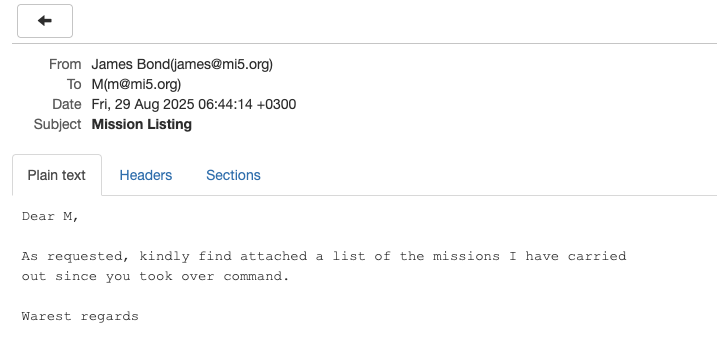
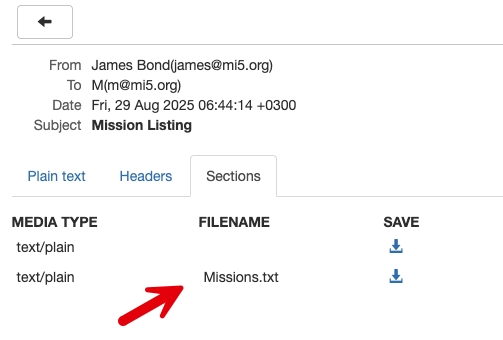
If we run this code, the email will look like this:
TLDR
In this post, we looked at how to send an email with attachments using MailKit.
The code is in my GitHub.
Happy hacking!