Sending Email In C# & .NET - Part 15 - Sending Calendar Invites Using MailKit
[C#, .NET, Email, StarLibrary, MailKit]
This is part 15 of a series on sending Email
- Sending Email in C# & .NET - Part 1 - Introduction
- Sending Email in C# & .NET - Part 2 - Delivery
- Sending Email in C# & .NET - Part 3 - Using Gmail
- Sending Email In C# & .NET - Part 4 - Using Office 365 & MS Graph API
- Sending Email In C# & .NET - Part 5 - Using Google Cloud API
- Sending Email In C# & .NET - Part 6 - Testing SMTP Locally Using PaperCut
- Sending Email In C# & .NET - Part 7 - Sending Inline Images Using SMTP
- Sending Email In C# & .NET - Part 8 - Sending HTML Email Using SMTP
- Sending Email In C# & .NET - Part 9 - Sending Multiple Format Email Using SMTP
- Sending Email In C# & .NET - Part 10 - Sending Plain Text Email Using MailKit
- Sending Email In C# & .NET - Part 11 - Sending HTML Email Using MailKit
- Sending Email In C# & .NET - Part 12 - Sending Email With Attachments Using MailKit
- Sending Email In C# & .NET - Part 13 - Sending Email With Inline Attachments Using MailKit
- Sending Email In C# & .NET - Part 14 - Sending Multiple Format Email Using MailKit
- Sending Email In C# & .NET - Part 15 - Sending Calendar Invites Using MailKit (This post)
- Sending Email In C# & .NET - Part 16 - Testing SMTP Locally Using Mailpit
Our last post, “Sending Email In C# & .NET - Part 14 - Sending Multiple Format Email Using MailKit”, looked at how to send multiple-format email.
In this post, we will explore how to generate and send calendar invitations using the iCalendar standard.
In MailKit, we are almost always working with the TextPart object.
This usually takes as a parameter either “plain" or "html".
It can also take "calendar" as a parameter.
Sophisticated email clients can render this natively with a UI for the user to accept or decline.
The process is as follows:
- Create a
MimeMessage - Create one (or more)
MailboxAddressfor the recipients and add to theTocollection of theMimeMessage - Create one
MailboxAddressfor the sender and add it to theFromcollection of theMimeMessage - Set the
Subjectof theMimeMessage - Create a
TextPartthat will have the plain text for the less sophisticated clients. - Create a
TextPartthat will have the calendar text for the more sophisticated clients. This should be rendered inline. - Finally, create a
MultiPartfor bothTextPartitems, and set that to theMessageBody. - Send the message using the
SmtpClient. This is theSmtpClientfromMailKit, not the one in System.Net.
The code would look like this:
using MailKit.Net.Smtp;
using MimeKit;
using MimeKit.Text;
using MimeKit.Utils;
using Serilog;

// Configure logging to the console
Log.Logger = new LoggerConfiguration()
    .WriteTo.Console()
    .CreateLogger();

const string fromAddress = "conradakunga@gmail.com";
const string toAddress = "cakunga@innova.co.ke";
const string fromPassword = "<YOUR APP PASSWORD HERE>";

// Create the email
var message = new MimeMessage();
// Add the sender
message.From.Add(new MailboxAddress("James Bond", fromAddress));
// Set the recipient
message.To.Add(new MailboxAddress("M", toAddress));
// Set the email subject
message.Subject = "Mission Brief";

var briefStart = new DateTime(2025, 8, 29, 10, 0, 0);
var briefEnd = new DateTime(2025, 8, 29, 10, 0, 0);
const string briefLocation = "MI6 HQ, London";

var plainText = $"""
                 Dear sir,

                 The schedule for the briefing is as follows:

                 Location: {briefLocation}

                 Start Date: {briefStart:d MMM yyyy HH:mm}
                 End Date: {briefEnd:d MMM yyyy HH:mm}
                 """;


var plainTextPart = new TextPart(TextFormat.Plain)
{
    Text = plainText
};

// Build the iCalendar content
var calendarText = $"""
                    BEGIN:VCALENDAR
                    PRODID:-//MI6//Mission Briefing//EN
                    VERSION:2.0
                    METHOD:REQUEST
                    BEGIN:VEVENT
                    UID:{Guid.NewGuid()}
                    DTSTAMP:{DateTime.UtcNow:yyyyMMddTHHmmssZ}
                    DTSTART:{briefStart:yyyyMMddTHHmmssZ}
                    DTEND:{briefEnd:yyyyMMddTHHmmssZ}
                    SUMMARY:Mission Briefing
                    DESCRIPTION:Briefing on the upcoming mission.
                    LOCATION:{briefLocation}
                    STATUS:CONFIRMED
                    SEQUENCE:0
                    BEGIN:VALARM
                    TRIGGER:-PT15M
                    ACTION:DISPLAY
                    DESCRIPTION:Reminder
                    END:VALARM
                    END:VEVENT
                    END:VCALENDAR
                    """;

// Create the calendar part
var calendarPart = new TextPart("calendar")
{
    Text = calendarText,
    ContentTransferEncoding = ContentEncoding.Base64,
    ContentDisposition = new ContentDisposition(ContentDisposition.Inline)
    {
        FileName = "invite.ics"
    }
};

// Set the method and name parameter values
calendarPart.ContentType.Parameters.Add("method", "REQUEST");

// Create multipart/alternative so clients can pick plain text or calendar
var alternativePart = new Multipart("alternative");
alternativePart.Add(plainTextPart);
alternativePart.Add(calendarPart);

// Set message body
message.Body = alternativePart;

// Now send the email
using (var client = new SmtpClient())
{
    Log.Information("Connecting to smtp server...");
    await client.ConnectAsync("smtp.gmail.com", 587, false);
    await client.AuthenticateAsync(fromAddress, fromPassword);
    await client.SendAsync(message);
    Log.Information("Sent message");
    await client.DisconnectAsync(true);
    Log.Information("Disconnected from server");
}
In this example, I am using the Gmail SMTP server to send the email to my Office 365 account.
When I run the code, I see the following in my Office 365 inbox, rendered by Outlook.
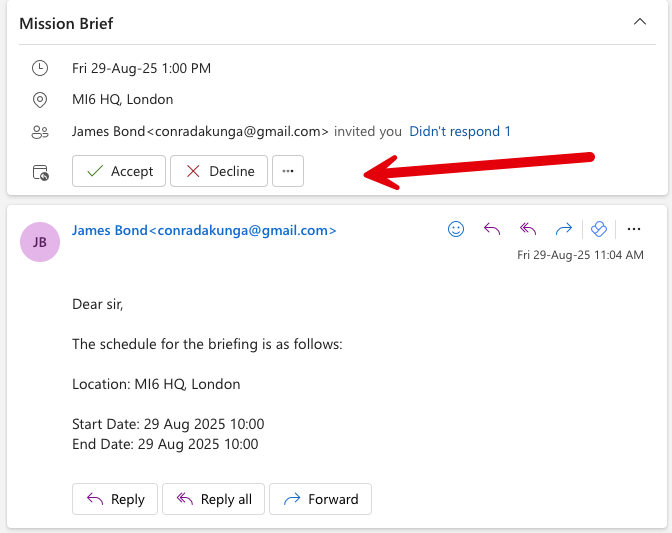
We can see here that Outlook has rendered action buttons that will merge the invite into my calendar if I accept.
TLDR
MailKit can send calendar invites that can be rendered inline by sophisticated email clients.
The code is in my GitHub.
Happy hacking!